3 things to build in Claude with Higgsfield before it goes paid
Get Higgsfield for Claude → See the Black Friday prices →
What you're making
Three things you can build inside Claude with Higgsfield: your own portfolio site in the exact look of a design you love, your own reel edited in the style of reference videos you love with Shorts Studio, and short AI dramas made with Seedance 2.5. You can run up to 8 images and 8 videos at once.
before you start
Connect Higgsfield to Claude
- 1. Open higgsfield.ai/mcp Sign up or log in. New users get a 3-day free trial.
- 2. Open Claude Settings, then Connectors Add the Higgsfield connector from that page and approve the sign-in.
- 3. Start a new chat Check Higgsfield shows as connected, then paste any prompt below.
- 4. Know the renewal After the 3 free days it moves to a paid plan unless you cancel, so set a reminder if you only want the trial.
the 3 builds
01. Build your own portfolio
Everyone's going to have a portfolio in 2027. Here's how to make yours in a look you already love.
- 1. Pick a design you like Browse an inspo site such as Godly, Awwwards, Land-book or SiteInspire, and open a site you love.
- 2. Screenshot the entire page Use a full-page screenshot Chrome extension such as GoFullPage, so Claude sees the whole layout, not just the top.
- 3. Fill in your details In the prompt below, replace everything in [brackets] with your own context: who you are, your projects, your links and the vibe you want. The more you give it, the more it feels like you.
- 4. Chuck it into Claude Code Open Claude Code in a new empty folder, drag in your full-page screenshot (and a photo of you, if you want one on the site), then paste the prompt. Type /mcp first to check Higgsfield shows as connected.
Here's what a good reference looks like: the whole page captured top to bottom, so Claude can see every section, not just the hero.
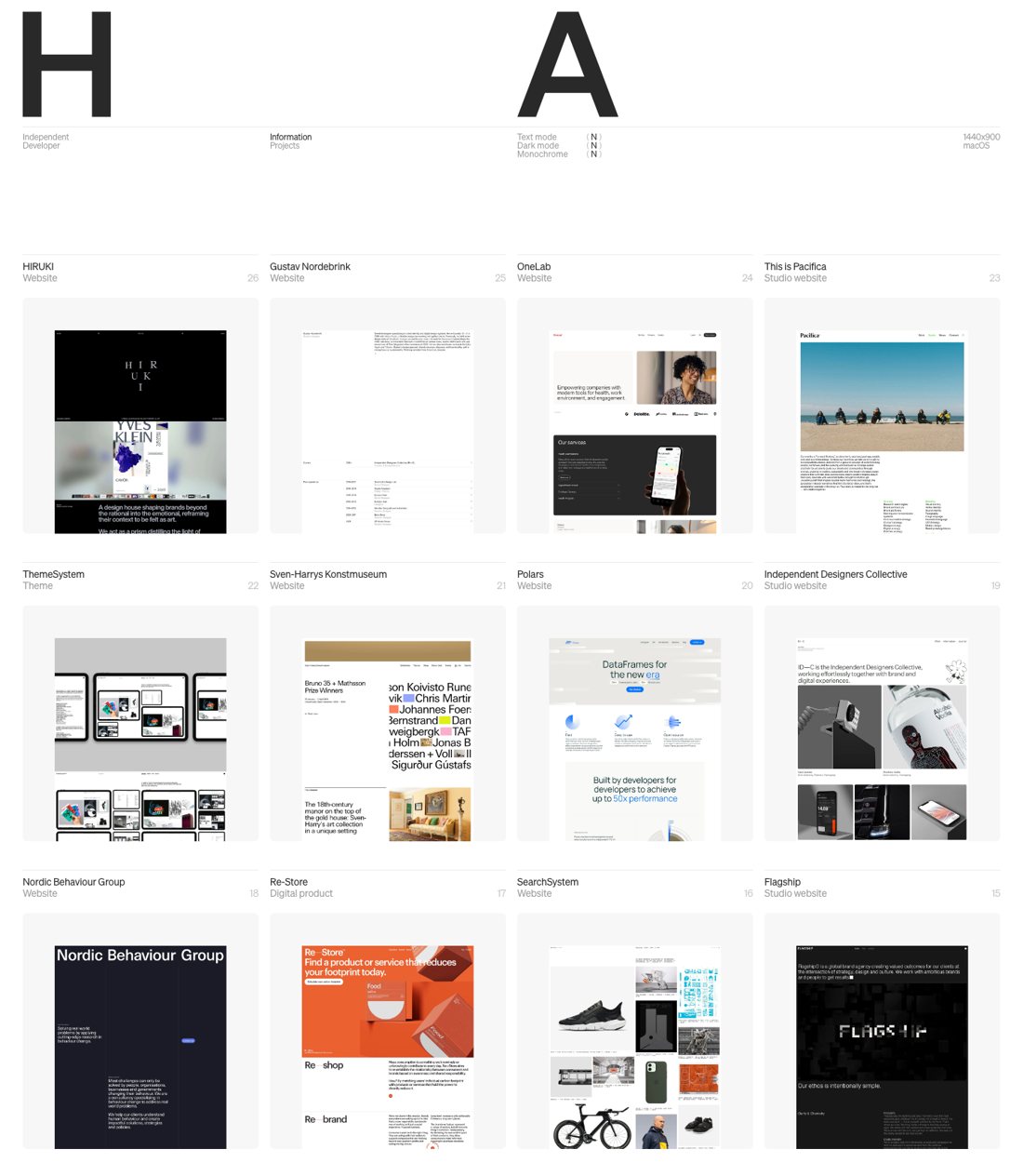
I've attached a full-page screenshot of a website I love. Build me my own personal portfolio website in that exact look, using my details below.

STEP 1: STUDY THE REFERENCE
Before you write any code, look at the screenshot closely and write me a short design brief:
- Layout and grid: how many columns, how wide the content is, how sections are spaced
- Section order from top to bottom (nav, hero, projects, about, contact, footer)
- Typography: the closest Google Fonts for headings and body, sizes, weights, letter spacing, upper or lower case
- Colours: background, text, accent and border colours as hex codes
- Details: corner radius, borders, shadows, image shapes and ratios, hover effects, how the nav looks
- The overall vibe in 3 words
Then build from that brief.

STEP 2: BUILD IT
- Match the reference's layout, spacing, type and colours as closely as you can. Same section order and same feel.
- Use the reference for design only. Don't copy its text, logo, photos or brand name. Every word on the page comes from my details below. No lorem ipsum, no placeholders.
- Sections: a hero with my name and one line about what I do, a projects grid (one card per project with an image, title, one line and a link), a short about me, and a contact section with my links. Add a page per project only if the reference has one.
- Images: generate every project thumbnail, background and visual with Higgsfield so they match the reference's style and colours. Make a few options at once and pick the best one for each spot. If I attached a photo of me, use it as it is. Don't generate my face.
- Make it a simple static site (HTML, CSS and a little JavaScript) in this folder, with no build step, so it's easy to publish.
- Fully responsive: looks great on a phone, a tablet and a laptop. Add smooth, subtle motion only if the reference has it.
- Add a page title, meta description, social share image and favicon using my name.

STEP 3: CHECK YOUR WORK
- Open the site in the browser. Take screenshots at desktop and phone width, compare them side by side with my reference, and fix anything that looks off: spacing, font sizes, colours, alignment, broken images, text overflowing on mobile.
- Repeat until it looks like the reference with my content in it. Then show me.

STEP 4: HELP ME PUBLISH
When I'm happy, give me the simplest free way to put it live (for example Netlify Drop) in plain steps.

MY DETAILS
Name: [your name]
What I do, in one line: [e.g. product designer helping startups launch apps]
Who I help or work with: [e.g. early-stage founders]
Projects (3 to 6): [project name, what it is in one line, the result, a link if you have one]
About me, 2 to 3 sentences: [your story, how you work, what you're known for]
Links: [email, Instagram, LinkedIn, YouTube, anything else]
Photo of me: [attached / no photo]
Vibe in 3 words: [e.g. minimal, editorial, warm]
Must have: [e.g. a services section, a testimonials row, a "book a call" button]
Avoid: [e.g. dark mode, stock-photo look, too many animations]02. Get Claude to edit your reels
You give Claude two things: your own cut video (the one you want edited) and the reference videos whose editing style you want. Claude reverse engineers how the references are edited, then Higgsfield Shorts Studio edits your video in that style, keeping your real face, voice and words.
- 1. Pick your reference videos Choose up to 5 short reels that are all edited in the one style you want (the same creator works best, so Claude can spot what they have in common). Download them as MP4 files. Public YouTube Shorts links also work, but Instagram and TikTok links often fail to download, so files are safer.
- 2. Get your own cut video ready This is your talking-head video, already trimmed to the take you want: vertical (9:16), clear audio, about 20 seconds to 2 minutes. Shorts Studio edits what you give it and never rewords you, so cut out mistakes first. If you filmed it in a few clips, you can attach up to 10 and it treats them as one video.
- 3. Reverse engineer the style In a new Claude chat with Higgsfield connected, attach your reference videos and send prompt 1. Claude analyses them with Higgsfield's video analysis and writes you an edit recipe. If Claude can't read a file, a Higgsfield upload box pops up: drop the video in there.
- 4. Edit your video with /shorts-studio In the same chat, attach your own cut video, plus the one reference that best shows the style, and send prompt 2. It tells you the credit cost in one line, then works on its own and gives you back a finished 9:16 video.
- 5. Review and give notes Watch it all the way through, then ask for one specific change at a time (examples below).
I've attached reference videos that all share the editing style I want. Use Higgsfield video analysis on each one, then write me one edit recipe that describes how they're edited, so I can recreate the style on my own video.

Cover each of these:
1. Hook: what happens on screen in the first 2 seconds
2. Pacing: average shot length and how often it cuts
3. Zooms and punch-ins: when they happen and how big
4. Captions: font feel, size, colour, position, how many words show at once, and which words get highlighted
5. Text on screen and titles
6. B-roll and screen recordings: how often, and what kind
7. Transitions
8. Sound effects and music
9. Colour and overall look
10. How much of the time the creator's face stays on screen
11. The ending and call to action

Give it to me as a numbered style guide, then a timeline template I can follow second by second for a 30 to 60 second video. Tell me which reference shows the style best.

Describe the style only. Don't copy their words, branding or footage./shorts-studio
Edit my attached video (my own recording) using the attached reference as the style reference and the edit recipe you just wrote.
Rules:
- Keep my real face, voice and words exactly as they are. No AI avatar, no voice changes, don't reword or cut anything I say (only remove dead air and repeated takes).
- Match the recipe's pacing, zooms, captions, text on screen, sound effects and look.
- Generate B-roll with Higgsfield only where it helps explain what I'm saying.
- Vertical 9:16, captions on.
When it's done, show me the video and list what you changed.
About my video:
- What it's about: [what my video is about]
- Who it's for: [who it's for]
- My call to action: [e.g. comment "guide" and I'll send it]
- Avoid: [e.g. loud music, emojis on screen, anything over my face in the first 2 seconds]03. Make short dramas with Seedance 2.5
Short AI dramas have been going insanely viral on Instagram lately, and a lot of them use Seedance. Start with one scene, then keep the same characters for the next episode.
Using Higgsfield Seedance 2.5, make episode 1 of a short vertical AI drama. Story: [one line, for example: a barista finds out her new customer is the CEO who just fired her]. Make 4 shots of about 5 seconds each: the setup, the twist, the reaction, and a cliffhanger. Keep both characters looking the same in every shot, cinematic natural light, 9:16. Give me the finished clips in order.before you post