Four websites to build with Claude x Higgsfield
Start here: the whole trick 🧠
Every site below runs on one simple idea. Three of them take a short video and move it forward or backward based on what you do, like your finger dragging a slider. The fourth (the secret reveal) does the same thing with two images instead of a video. Either way, your cursor, your hand, or the scroll bar becomes the slider, and that is what makes a flat page feel like a living 3D world.
The two sites that put a raw video on the page (the 3D world and the parallax scroll) need one small bit of prep first, and it is the only slightly techie part of the whole guide:
You never need to see this, but for the curious, here is the exact one-time command Claude runs for you:
ffmpeg -i input.mp4 -an -c:v libx264 -crf 20 -g 1 -keyint_min 1 \
  -x264-params "keyint=1:min-keyint=1:scenecut=0" -pix_fmt yuv420p \
-movflags +faststart hero.mp4The interactive secret reveal portfolio 🌱
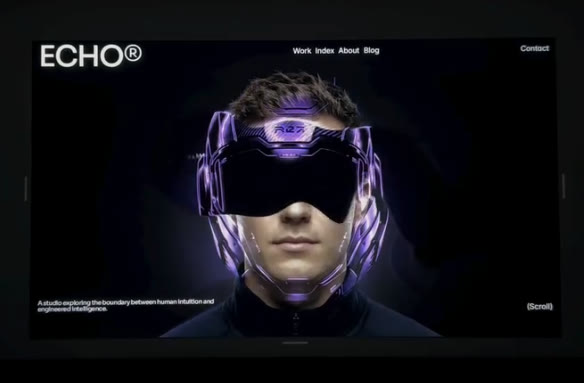
A hero where someone drags their mouse across your face and a chrome version of you ripples into view underneath. It looks 3D, but it is just two flat images stacked, and your cursor paints a soft hole through the top one.
- 🌱 Generate your portrait In Higgsfield, upload a clear, front-on photo of yourself and make a clean studio portrait on a black background.
- 🪞 Generate the chrome layer Feed that portrait back in and make a chrome or helmeted version. The two images have to line up perfectly, same size and same position, or the reveal looks off. That lining-up is the whole trick.
- 🎛️ Build the reveal Stack the two images in a free drag-and-drop effects tool (Unicorn Studio, no coding), or skip that and have Claude build the reveal from scratch (free, no watermark).
- 💻 Wrap it into a page Paste the effect into Claude with one prompt and it builds the whole landing page around it.
The hand-tracking paper scrunch website ✋

A black portfolio page where a papercraft portrait of you crumples into a paper ball as you close your fist, live on your webcam. Same trick as the rest, with your hand as the slider instead of your cursor.
- 🖼️ Make the flat portrait In Higgsfield, use Seedream with a few photos of yourself to make a papercraft sculpture portrait on black.
- 🤌 Crush it into a video Give that portrait to Seedance as the start frame and prompt the whole sculpture to slowly scrunch into a paper ball, one continuous take.
- 🛠️ Wire it up in Claude One build prompt adds the webcam hand-tracking (it sets this up for you) so opening and closing your hand plays the video forward and back, keyframe fix included.
The 3D world website 🌌

A full-screen world you explore by moving your mouse left and right. It feels like a game engine, but it is just a video of a slow camera glide, moved by your cursor's position. Mouse to the left, the camera is at the start of the pan. Mouse to the right, it is at the end.
- 🎬 Generate the world video In Higgsfield, pick a video model built for one smooth continuous take (Seedance, or Cinema Studio 3.5). For the most control, generate a still of your world first, then animate it as the start frame. Add a single slow sideways camera move (its DoP camera presets, like Dolly Right), and run it through Higgsfield's AI Background Video Generator so you get a seamless loop with the center kept clear for text.
- 🌌 The prompt Slow and steady is everything here.
Slow continuous lateral camera glide moving steadily left to right through a
glowing bioluminescent forest. Towering trees with softly pulsing teal and violet
fungi, drifting spores and floating light motes, gentle volumetric god rays, low
mist along the ground. The camera trucks sideways at one single constant slow speed,
like a smooth dolly on rails, one uninterrupted take. No cuts, no scene changes, no
zoom, no camera shake, no whip pan, no flashing. Dreamy cinematic atmosphere, deep
depth of field, soft focus background, calm and hypnotic. Even ambient motion
throughout, loop friendly.- 💻 The build prompt Save your clip as
world.mp4, open Claude Code in that folder, and paste this. No Claude Code? Paste it into regular Claude, download the HTML, and put it next to your video.
Build me a single self-contained index.html: a full-screen "3D world explore" hero.
Put world.mp4 as a fixed, full-viewport background (object-fit: cover, muted,
playsinline, preload="auto", with a poster image). Keep the video PAUSED and drive
it with the mouse: map the cursor's horizontal position across the screen to the
video timeline, so mouse far left seeks the first frame and mouse far right seeks
the last frame, opening centered on the middle. Do the scrubbing inside a
requestAnimationFrame loop that eases currentTime toward the target (a lerp) so the
camera glides instead of snapping. Never set currentTime directly in the mousemove
event, and guard the scrub until loadedmetadata so duration is never NaN. Layer a
short headline and nav over the top with z-index. On touch devices or when
prefers-reduced-motion is set, do not scrub: quietly autoplay-loop the video
instead, or show the poster. Also re-encode my video with ffmpeg using
-x264-params keyint=1:min-keyint=1 -pix_fmt yuv420p so every frame is a keyframe and
the scrub is instant, and extract the first frame as poster.jpg (ffmpeg -frames:v 1)
to use as the poster. Then run it and show me a preview.The parallax scroll website 🎞️
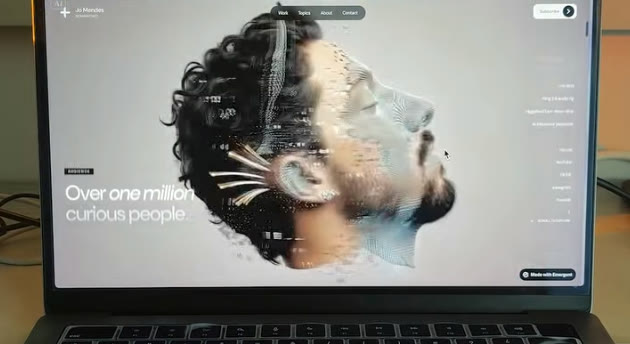
A hero that plays a cinematic video as you scroll down the page. Scroll a little, the video moves a little. It looks like a 3D scene rendering in real time, but it is literally just a video whose timeline is tied to your scroll bar. This is the easiest of the four to make.
- 🎬 Generate the hero video In Higgsfield, make a slow cinematic clip: a portrait dissolving into particles, a gentle push-in, a product turning. Same rules as the 3D world: one continuous take, subtle motion, one camera move. Upload a start frame for control, and use the AI Background Video Generator for a clean loop.
- 🎞️ The prompt Slow, one continuous take, same rules as the world video.
Start from a calm portrait on a dark studio background. The face slowly dissolves
into fine drifting particles from one side, dust and tiny fragments lifting gently
and floating away in slow motion while the rest of the face stays intact. Soft
directional light, subtle glowing embers, deep black backdrop. The camera holds one
slow steady push in, one continuous take. No cuts, no flashing, no fast bursts.
Elegant, ethereal, cinematic. Even slow motion throughout, loop friendly.- 💻 The build prompt Save your clip as
hero.mp4, open Claude Code in that folder, and paste this.
Build me a single self-contained index.html: a cinematic scroll-video hero. Create a
tall scroll section (about 400vh) with an inner sticky wrapper pinned to the viewport
(position: sticky; top: 0; height: 100svh) holding hero.mp4 (object-fit: cover,
muted, playsinline, preload="auto", with a poster). Keep the video PAUSED and drive
its timeline by scroll: as I scroll through the tall section, map my progress from 0
to 1 onto the video from first frame to last frame. Do it inside a
requestAnimationFrame loop that eases currentTime toward the target (a lerp) so it
feels buttery, not jumpy. Never set currentTime directly in the scroll event, and
guard the math until loadedmetadata so duration is not NaN. Layer a headline over the
hero with z-index, and add a couple of normal page sections below it. On touch or
prefers-reduced-motion, skip the scrub and autoplay-loop the video or show the
poster. Also re-encode my video with ffmpeg using -x264-params keyint=1:min-keyint=1
-pix_fmt yuv420p so every frame is a keyframe and scrubbing is smooth, and extract
the first frame as poster.jpg (ffmpeg -frames:v 1) to use as the poster. Then run it
and show me a preview.Cheat sheet: which video for which site 🎥
🎬 Higgsfield (every video and image) · 🤖 Claude Code · 🦄 Unicorn Studio · 👀 ripple demo · scrunch demo